


Developer Focus: Code Explanation Prompt
Onboarding new developers to a complex project can be time-consuming. Utilizing advanced AI prompts can streamline this process by breaking down unknown files into digestible logic. The following template from CopilotHub forces the AI to prioritize data flow and architectural tradeoffs over basic syntax explanations.
Explain the following code to a developer who just joined the project and has not seen this file before.

Focus on:
  - What the code is responsible for.
  - Key functions and their roles.
  - How data flows through the code.
  - Any non-obvious decisions or tradeoffs.

Code:[Paste code here]
Creative Design: Regional Dioramas
Generating highly detailed, thematic visual art requires strict parameter controls. The Gdgtify community shared a rigorous prompt tailored for NanoBanana to create luxurious, pop-up book-style dioramas. This is a perfect example of how advanced AI prompts use modular variable inputs to maintain a consistent aesthetic across different generations.


Recreate the exact visual logic of the reference image: a luxurious white-and-gold regional diorama rising from a thick book, with landmarks, transit, mountains, and clockwork details fused into one collectible tabletop world.
Input Variables:
[INSERT PLACE OR REGION]
[INSERT PRIMARY LANDMARK CLUSTER]
[INSERT SECONDARY LANDMARKS]
[INSERT TOPOGRAPHIC BACKDROP]
[INSERT LOCAL TRANSIT ELEMENTS]
[INSERT CULTURAL ARCHITECTURAL LANGUAGE]
[INSERT TITLE SCRIPT OR TYPOGRAPHY STYLE]
[INSERT SYMBOLIC SKY ELEMENTS]
Workflow:
Use a thick closed-edge book as the base object, resting on a polished wooden table in a premium studio setting.
Place [INSERT TITLE SCRIPT OR TYPOGRAPHY STYLE] on the visible side of the book as raised metallic lettering tied to [INSERT PLACE OR REGION].
Transform the top of the book into a pop-up miniature world representing [INSERT PLACE OR REGION], with [INSERT PRIMARY LANDMARK CLUSTER] as the dominant architectural anchors.
Surround them with [INSERT SECONDARY LANDMARKS], ensuring the skyline reads as an instantly recognizable condensed destination tableau.
Build [INSERT TOPOGRAPHIC BACKDROP] as sculpted terrain rising behind the architecture, integrated smoothly into the book-world rather than appearing separate.
Layer [INSERT LOCAL TRANSIT ELEMENTS] across and through the composition: roads, rail, bridges, tunnels, platforms, or civic circulation routes crossing the book's surface.
Use [INSERT CULTURAL ARCHITECTURAL LANGUAGE] to unify the cityscape so every building feels place-specific yet stylized into the same premium sculptural system.
Add floating [INSERT SYMBOLIC SKY ELEMENTS] above the scene, such as clouds, sun emblems, timing motifs, or symbolic ornaments, suspended like part of a storybook mechanism.
Reveal a partial underside or side cutaway of the book pages containing intricate gears, clockwork, or ornamental mechanical filigree.
Populate the world with tiny people, vehicles, and civic activity so the scene feels alive at miniature scale.
Keep the full palette primarily matte white with polished metallic gold accents, making the entire world feel collectible, ceremonial, and luxurious.
Frame the image in a slightly elevated three-quarter view so both the book form and the full miniature city are clearly visible.
Details:
Ultra-clean white sculptural surfaces, porcelain-meets-papercraft realism, rich metallic gold trim, miniature urban density, premium travel-collectible aesthetic, crisp studio lighting, subtle star glints on polished edges, elegant shadow falloff, hyper-detailed gears, cinematic depth, 8K, octane-rendered photorealism, luxury editorial product shot fused with world-building.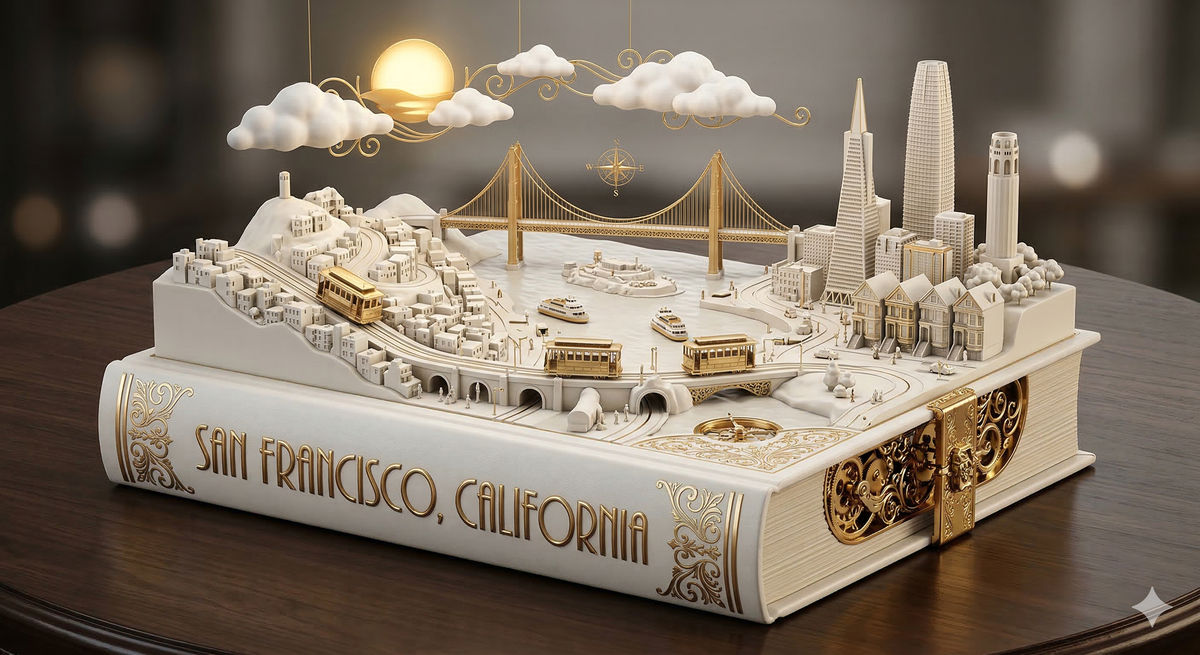
E-commerce: Generating Product Shoots with Grok
Consistency is the biggest challenge in AI commercial photography. By using sequential advanced AI prompts, you can use Grok's Aurora model to generate a full set of product photos that look identical to a single studio session.


Navigate to Grok and upload your base product photo.
Prompt:
"Product photo of [your product] on a matte black surface, soft box lighting from the upper left, shot on an 85mm lens, f/2.8, shallow depth of field, commercial product photography."Maintain the exact studio description in your next prompt, changing only the camera angle (e.g., "3/4 angle" or "close-up macro").
For lifestyle shots, explicitly describe the product in use while retaining the original lighting and mood parameters.
Video Production: Seamless AI Lip Syncing
Audio-video synchronization has become highly accessible. Freepik offers a simple workflow for creating perfectly lip-synced videos without complex software.
Sign up for a Freepik account and navigate to
Video > Tools > Speak.Upload a base image or video of your character.
Describe the character's dialogue and emotional delivery through text.
Select a suitable AI voice model or upload your own audio file to ensure authenticity.
Click 'Generate' to output a synchronized talking video in seconds.
Daily Utility: Custom Alarm Clocks
AI is increasingly permeating basic daily utilities. A trending workflow utilizes Gemini to generate personalized alarm clock songs. Users can prompt the AI with their specific music tastes and morning routines to dynamically create customized tracks designed to wake them up effectively. Implementing these advanced AI prompts transforms standard phone utilities into hyper-personalized experiences.

