


Visual Content Creation with AI Prompts
Creating compelling visuals is one of the most popular uses for generative AI. With the right AI prompting techniques, you can produce professional-grade images that stand out without looking like generic AI creations. These methods focus on structure and creativity to give you more control over the final output.
How to Create Killer Thumbnails with Midjourney
A great thumbnail can make all the difference for a YouTube video or blog post. This technique uses a structured prompt to generate eye-catching images with space for text overlays. Start by asking a chat agent like Claude to generate four Midjourney prompts based on your topic using this specific structure:
[Person + Expression] +[Action/Prop] + [Setting] + [Lighting] + [Composition with negative space] --ar 16:9Once you have a generation you like in Midjourney, use the Vary (Subtle) or Vary (Strong) options to fine-tune it. Finally, import the image into a tool like Canva and add 1-5 words of large, blocky text. If you can't get the text to fit, simply ask your chat agent for a new prompt that creates more space.
The 'Nano Banana' Prompt for 3D Illusion Artwork
For more creative and artistic visuals, the "Nano Banana" prompt style has become popular for creating brand-worthy posters and mind-bending illusions. The key is highly detailed and descriptive language. Here's an example prompt for creating a 3D illusion of a girl stepping out of a notebook:
A creative 3D illusion artwork of a cute young girl stepping out of a spiral notebook page placed on a wooden desk. The notebook has lined paper with handwritten text at the top. The girl looks semi-realistic 3D cartoon style, soft wavy brown hair, natural makeup, sweet smile, wearing a pastel crop top and high-waisted light grey jeans with white sneakers. Her lower body appears sketched in pencil on the notebook while the upper body looks realistic and popping out of the page.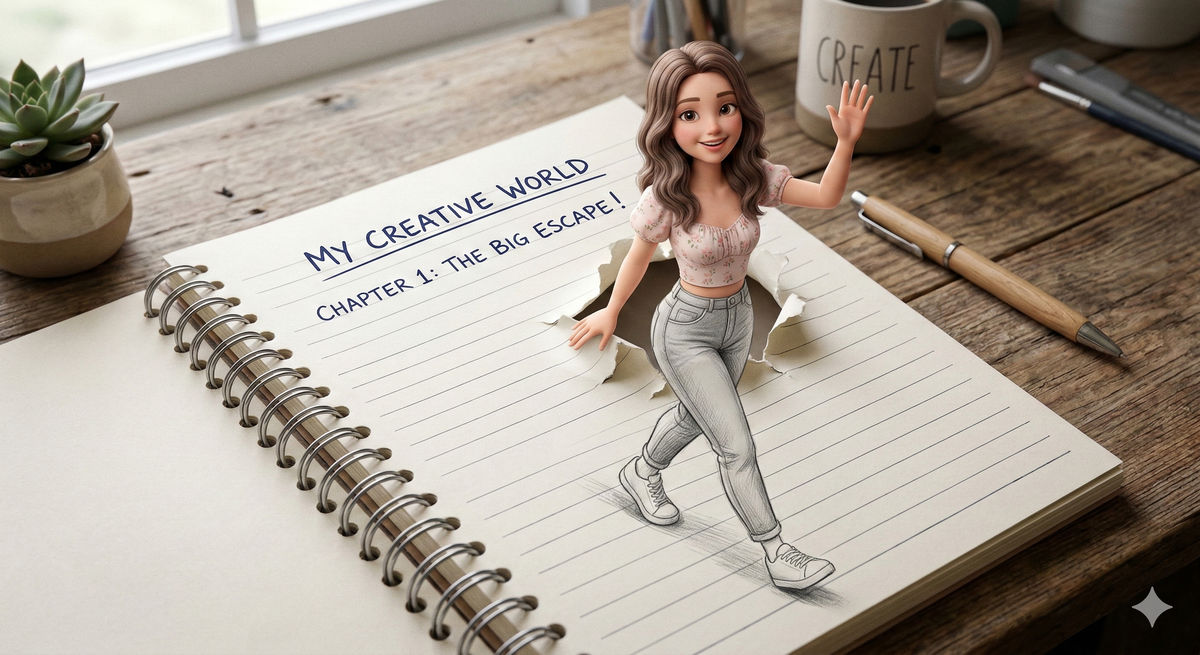
Business and Productivity AI Prompting Techniques
Beyond images, structured prompts can dramatically improve AI for productivity. From preparing for high-stakes meetings to organizing your job search, these sales prompts and workflows can save you time and improve your performance.
Preparing for a Key Prospect Meeting
Walk into your next sales call fully prepared. This multi-part prompt, which can be used with an agent connected to your data, helps you gather intelligence, understand the prospect's needs, and generate talking points.
Goal: Be fully prepared to discuss a prospect's needs and demonstrate how your solution can help.

Find:
"Find all CRM records, past email correspondence, and meeting notes for prospect [Prospect Company Name]."
"Locate recent news articles or press releases about [Prospect Company Name] and their industry."

Understand:
"Summarize [Prospect Company Name]'s key business challenges and stated needs based on our past interactions."
"Identify the key decision-makers and influencers at [Prospect Company Name] involved in this potential deal."

Act:
"Generate a list of 5 tailored talking points and 5 discovery questions for my upcoming meeting with [Prospect Company Name]..."
"Draft a personalized follow-up email to send after the meeting..."
Prompts to Land More Interviews
While the specific prompts weren't shared, a trending guide highlights a series of seven prompts designed to assist with the job hunt process. These can help with everything from resume tailoring to interview preparation, demonstrating how AI can be a valuable career-coaching tool.
Practical AI Workflows and Guides
Some of the most powerful AI workflows involve connecting tools and setting up automations. These guides provide step-by-step instructions for getting more out of your AI assistants.
How to Dub Videos into Any Language with HeyGen
Expanding your content's reach is easy with video dubbing AI. Using a tool like HeyGen, you can translate and dub your videos in minutes:
-
Go to HeyGen and sign up.
-
Click on 'Translate' and upload your video or provide a link.
-
Select your target language.
-
Wait for the process to complete, then download or share your dubbed video.
A Beginner's Guide to Setting Up OpenClaw
A comprehensive guide to OpenClaw setup is now available, helping users harness this powerful open-source AI assistant. The guide covers a three-tiered approach: a simple laptop installation, a 24/7 server deployment, and setting up your first tasks, like managing a to-do list. It also explains how to connect tools like your email and calendar to create a personalized morning briefing.
Reader Workflow: AI for Hearing Preparation
A community member shared a powerful use case for AI in legal preparation. By uploading case documents (with confidential details removed) into a chat agent, they instructed it to act as a demanding and skeptical cross-examiner. This structured rehearsal helped sharpen their reasoning and build confidence before the hearing.


