Expert-Level Developer Workflows
The most significant development in AI prompt engineering comes directly from the team at Anthropic. They've revealed that their internal process relies on treating AI not as a single assistant, but as a coordinated team of specialized agents.
The Claude Code Team's Multi-Agent Strategy
In a detailed thread, the Claude Code team outlined their advanced workflow, which mirrors the functionality of the new OpenAI Codex app. Their strategy involves running three to five parallel git worktrees, each with a separate Claude session. This allows them to tackle different parts of a problem simultaneously, effectively creating a small, managed swarm of AI developers.
Key components of their process include:
Plan Mode: Always starting complex tasks in "plan mode" to outline the steps before generating code.
CLAUDE.md File: Maintaining a markdown file within the project that Claude itself updates after every mistake, creating a persistent feedback loop and memory.
Subagents: Leveraging subagents to manage context and avoid the "context rot" that plagues long conversations with LLMs.
This multi-agent approach represents a significant shift from simple prompting to active agent orchestration, a core skill for the next generation of software development. Similar principles are being used to build cross-platform voice chats and agentic personal knowledge management systems with OpenClaw.
Practical Prompts for Daily Tasks
Beyond complex developer workflows, new prompts have emerged to streamline common business and content creation tasks.
Summarize Any Meeting with the ChatGPT App
The ChatGPT desktop app now includes a feature to record and transcribe meetings directly. After stopping the recording and uploading the transcript, you can use targeted prompts to extract key information. This turns a long conversation into actionable insights.
A simple yet powerful follow-up prompt is:
Highlight any risks, blockers, or unresolved questionsThe Universal Editing Prompt for Maximum Clarity
For writers and content creators, a well-structured editing prompt can significantly improve readability. This prompt tasks the AI to act as an expert editor, focusing on clarity and flow without altering the core message.
Prompt:
You are an expert editor specializing in clear, concise, and easy-to-read writing.

Your task is to edit the text below to maximize clarity, logical flow, and readability while preserving the original meaning and intent.

Guidelines:
Remove unnecessary words, filler, and repetition
Tighten sentences without oversimplifying ideas
Improve logical flow and transitions between sentences
Break up long or complex sentences where needed
Replace vague or confusing phrasing with clear, concrete language
Maintain the original tone and voice
Do not add new ideas or opinions

[paste text here]
Using Claude Cowork for Local SEO
A trending tip shows how to use Anthropic's models for a specific business use case: local SEO. By providing the model with business details and target keywords, users can generate locally-optimized content to outrank competitors.
Advanced Creative Generation
For visual content, detailed, multi-step prompts are key to achieving specific artistic effects and professional-quality results.
How to Generate Professional AI Headshots
A detailed workflow has been shared for turning simple selfies into professional headshots using Google's Nano Banana Pro model via Google AI Studio. The process involves using a high-quality source image and a descriptive prompt focused on post-processing enhancements rather than generating a new face from scratch. The key is to prompt for edits like "professional color grading," "balanced studio lighting," and "subtle dodging and burning" while instructing the AI to "maintain original facial structure."
Prompt Recipe: The Instagram 3D Pop-Out Effect
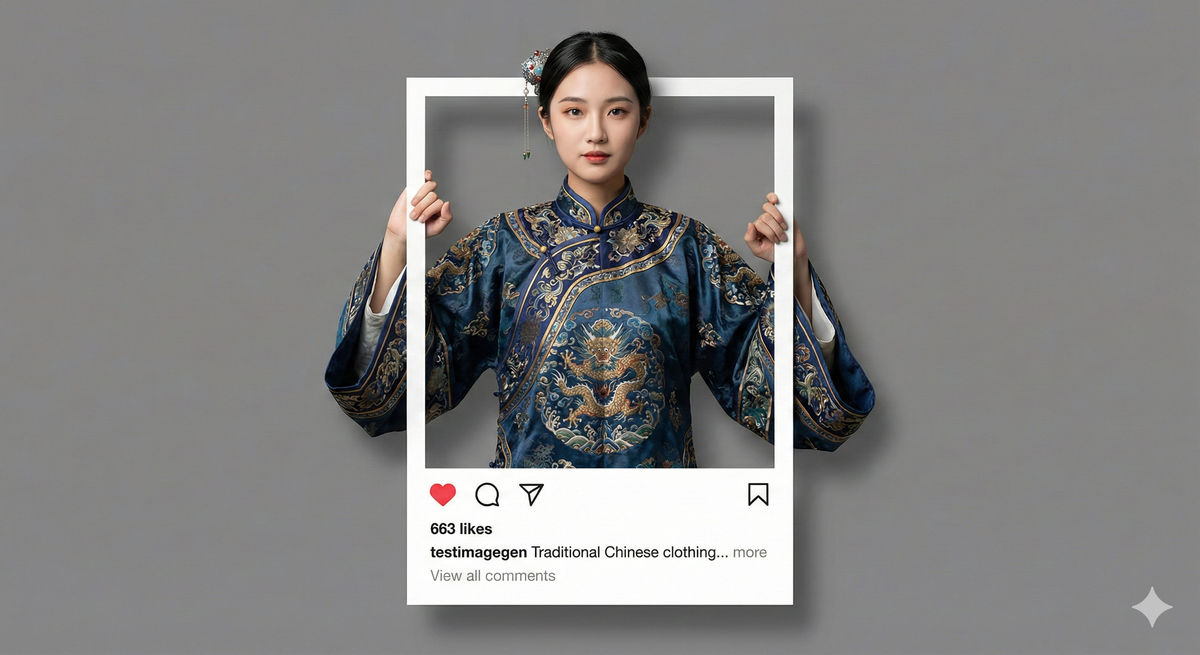
A highly detailed prompt structure allows users to create a popular social media visual: the 3D pop-out effect. The prompt is broken into sections to control the subject, frame, UI elements, and the specific action of popping out of the frame.
A photorealistic fashion upper body shot of [Character Description and expression] wearing [Detailed Outfit Description]. The subject is framed inside a central white Instagram-style post border.

Composition & Spacing: The white frame is perfectly centered in the middle of the image, leaving balanced empty [Soft Background Color matching the outfit] space above and below the frame to match the theme.

Frame Details: The top, left, and right white borders are very thin. The bottom white section is thicker to include UI elements. The bottom section features a red heart icon, comment bubble, share icon, and bookmark icon.

Text Details: Clearly visible text on the bottom panel: "[Number] likes", username "[Username]", caption "[Caption text]... more", and below that, "View all comments".

3D Pop-Out Effect & Hand Pose: [CHOOSE ONE ACTION, E.g., (Grip): head and arms are physically popping out OVER the top and side thin borders. hands are realistically gripping the outer edges of the thin side borders, appearing to hold the frame firmly.]

Subject Dimensionality & Texture: The subject must look like a solid, three-dimensional figure, not flat. Emphasize the detailed texture, the contours of the face, and realistic hair details.

Lighting & Shadows: Professional studio lighting creating soft, realistic drop shadows cast by the physical frame.