


What is Kling AI?
Kling AI is a high-end generative video platform developed by Kuaishou Technology. As of 2026, it is widely recognized for its Kling AI 3.0 Omni and 2.6 Motion Control models, which allow users to generate videos up to 30 seconds long using text or image prompts. It is one of the few tools that offers "Native Audio," a feature designed to generate sound effects and character dialogue simultaneously with the video frames, promising a seamless, one-click production experience.


Kling AI Audio Sync Issues: Why 15 Seconds is the Enemy of Audio Sync
The most frustrating experience for any creator is watching a perfect 10-second shot slowly unravel as the character's mouth begins to move independently of the sound. This phenomenon, known as temporal drift, is currently the biggest hurdle in Kling AI video generation errors.
When you generate a clip longer than 5 seconds, the AI's "mental model" of the character's facial structure begins to fluctuate. Because most diffusion models process video in chunks or "latents", the synchronization between the audio waveform and the visual lip-phonemes (the shapes the mouth makes) begins to decouple. By the 10-second mark, the result is often gibberish AI audio where the character continues to mumble nonsensical sounds after the intended script has finished, or morphs the script altogether.
Common Manifestations of the Audio Bug
Issue Type | Symptom | Severity |
The "Silent Mumble" | Character's lips move for 2-3 seconds after the audio ends. | High |
Phoneme Mismatch | The "O" and "P" mouth shapes lag behind the sound. | Medium |
Vocal Hallucinations | The AI adds gibberish instead of the intended script. | High |
Model Drift | The character’s face slightly morphs while speaking. | Medium |
How to Fix AI Video-Audio Drift: Professional Workarounds with Kling AI Lip-Sync
If you are tired of wasting "Inspiration Credits" on unsynced videos, industry professionals in 2026 have moved away from the all-in-one generation approach. Instead, they use a decoupled workflow to maintain quality. One of the best and easiest solutions for this is using Kling AI's very own Lip-Sync feature. It's built in, it's accessible, and it's very cheap in terms of credits. Depending on what kind of mess you're in with your generated video, there are different methods to apply.
If you prefer to learn more about Kling AI audio sync issues and solutions from a video, we have created one for you. It is based on our first-hand experience, with a step-by-step guide of the solution:
1. Using The Original Audio
If your generated video actually has a great-sounding voice, but there is an audio-video desync issue, just use the original audio from the video clip. Run it through the lip-sync tool, and let Kling remap the mouth to match the words perfectly.
2. Using An ElevenLabs Voicover
If your video's audio turns into complete gibberish, you need a fresh voiceover. This is where you use a dedicated AI voice generator like ElevenLabs. Just by typing a script and adding emotional tags, you can generate a highly realistic voice with actual human emotion, and upload that audio file into Kling. We created an ElevenLabs Eleven v3 cheat sheet, where we guide you through how to use ElevenLabs text-to-speech like a pro, so you can get those cinematic, professional results.


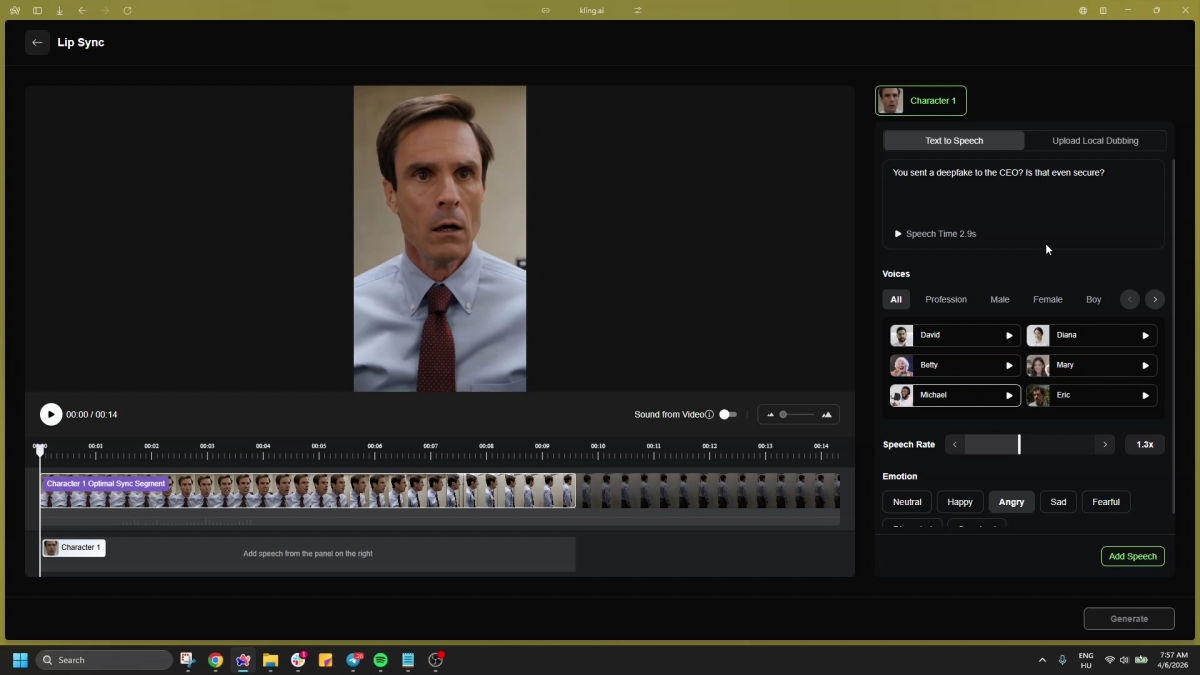
3. Using Kling AI's Lip-Sync Audio Generator
As always, let's start with the truth: The audio generator of Kling AI is not nearly as good as using ElevenLabs. Even though you can play around with the speed and emotional tone of the speech, it usually sounds a bit robotic. It will work for a quick meme or a background character, but if you want your audience to actually connect with your video, stick to Option 1 or 2.
Closing Thoughts
Kling AI has revolutionized the look of AI cinema, but it has yet to master the sound. Until the model's architecture can maintain temporal consistency over longer durations, the one-click generation of talking characters will remain a gamble for longer videos. For now, the secret to professional results lies in treating audio as a separate, surgical layer rather than a byproduct of the visual prompt.